
A CRM for your industry: not a canned template, a setup around your process
From real estate to auto parts, the backbone is the same: customer record, sales pipeline and WhatsApp. Fields, sales stages, roles and reports are configured for your industry. We do the configuration, and after the discovery call we give you a date, not a range.
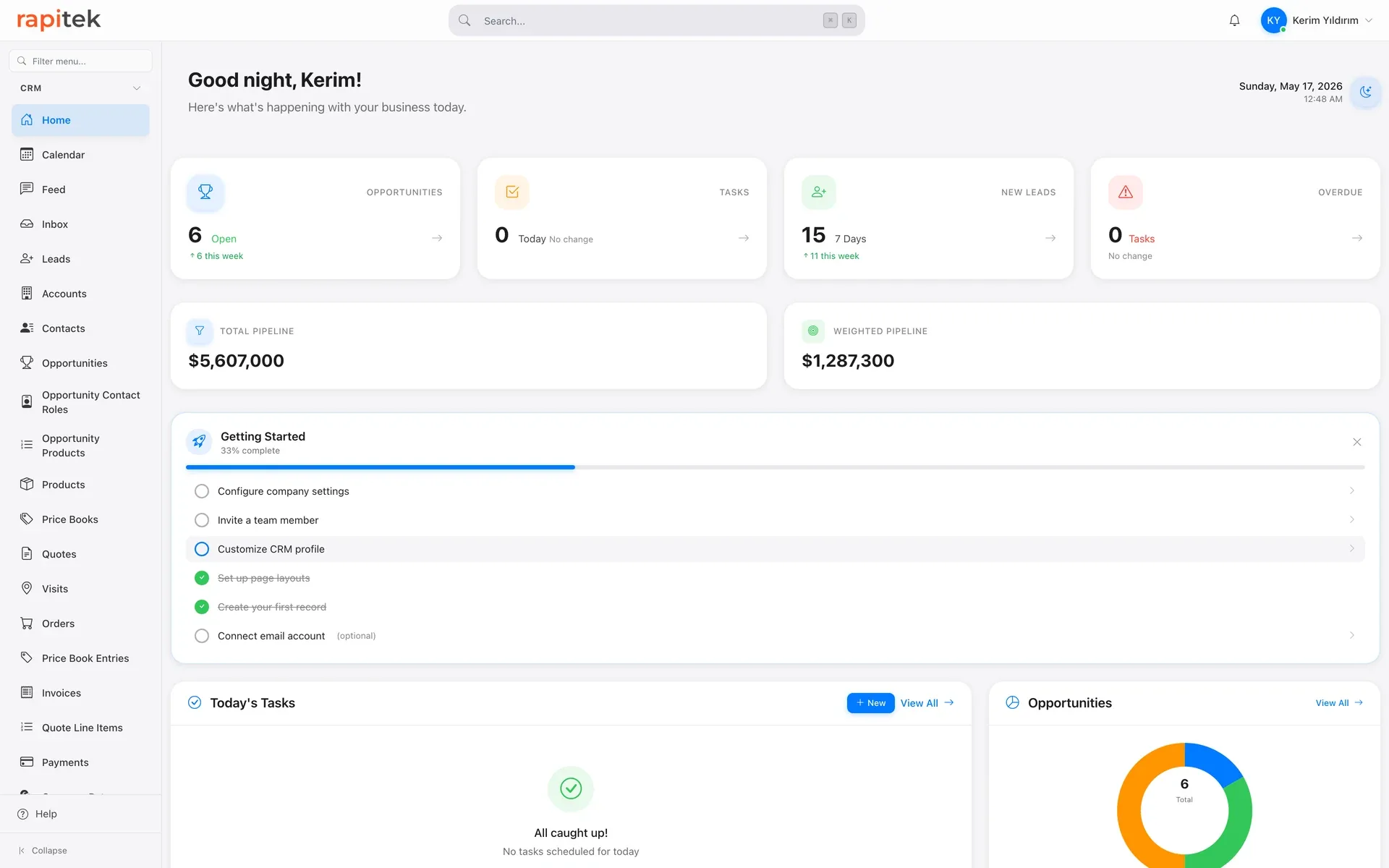
What does "industry-specific CRM" mean at Rapitek?
In this market “industry-specific CRM” usually means one thing: dozens of industry pages placed in front of the same product. We do have industry pages and we keep them, because the question the person doing that job asks is a real one: what goes wrong here, and where does information get lost. But none of those pages describes a “ready industry package”; every one of them leads to the same door: one product, a different setup.
What our founder saw across more than 200 Salesforce projects is this: the backbone of a good CRM is industry-agnostic. The customer record, the sales pipeline, team-wide WhatsApp, permissions and reporting do the same job at a real-estate office as at an auto-parts wholesaler. What is industry-specific is not the product but its setup: which fields are kept, how the stages are named, who sees what, which report goes to whom.
That is why we don't sell a “ready CRM package for industry X”. We configure Rapitek CRM around your process, and we do the configuration ourselves; the scope of setup, and any fee for it, is worked out in the discovery call and put in writing before the work starts.
The backbone that stays the same in every setup
Customer record
Account, contact, call notes, quotes and tasks on a single record. Who called when, what was discussed, what comes next: everyone on the team sees the same history.
Sales pipeline
Opportunities move stage by stage, tracked in Kanban and list views. Steps that stall or never happen show up in reports.
Shared WhatsApp inbox
The team writes from the business's single work number; messages land in a team inbox and are logged on the customer record. When an employee leaves, the conversation history stays with the business.
Role-based permissions
Decide who sees which records and reports by branch, dealer, region or team. Managers get the consolidated view; reps see their own work.
Reports and dashboards
Tabular, summary and matrix report types, plus a drag-and-drop dashboard designer. Built on your metrics, without writing code.
Tasks and calendar
Follow-up tasks, reminders and two-way appointment sync with Google Calendar. Follow-ups are entrusted to the system, not to somebody's memory.
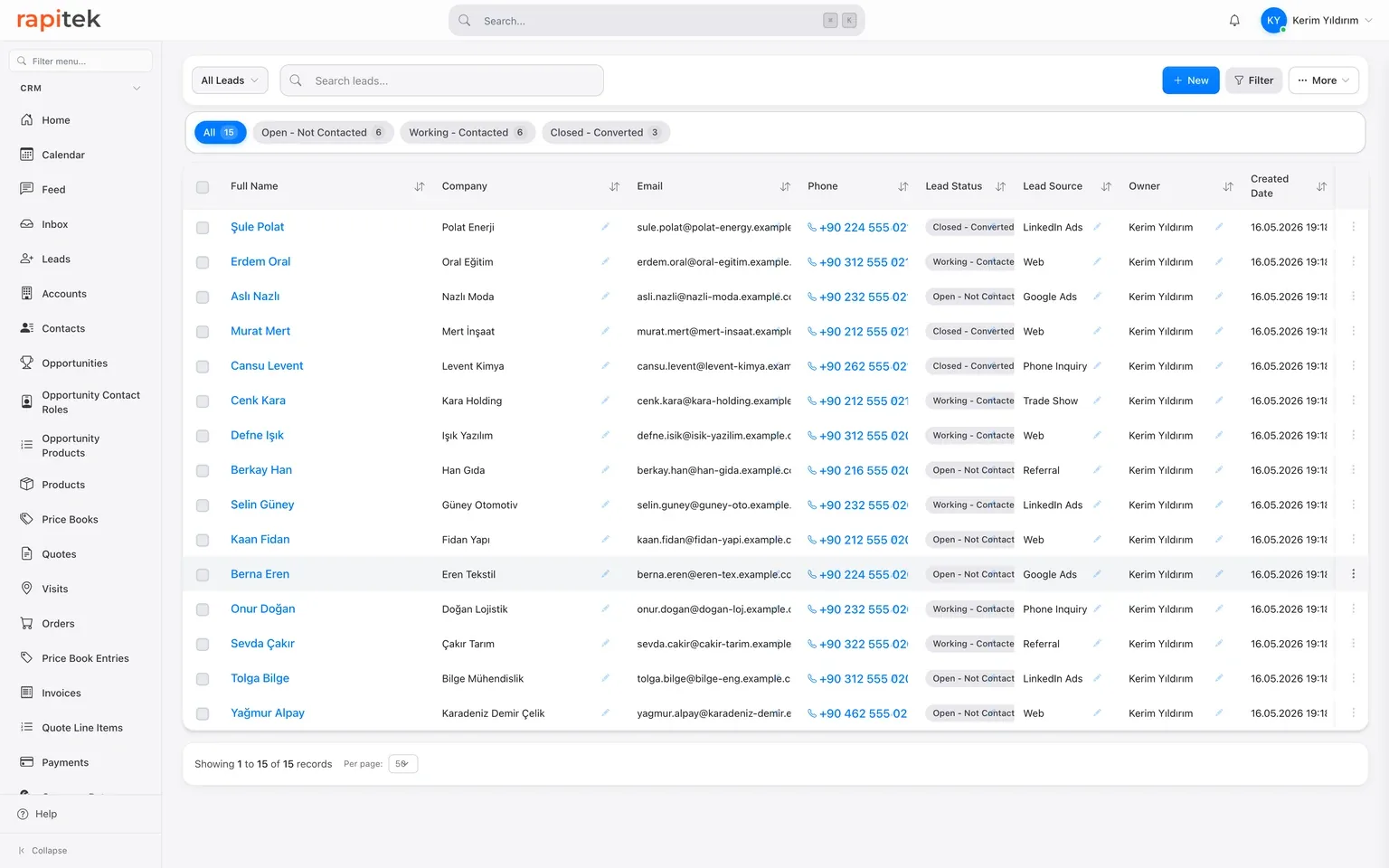
The same screen, your fields
This is the standard lead list. For a real estate office, budget and target-area columns are added; for a tire dealer, vehicle and season data; for an auto parts wholesaler, dealer and brand fields. Same screen. We define the fields, filters and saved list views for your business during setup.
What changes by industry, and what stays the same?
| Layer | Same in every setup | Configured for your industry |
|---|---|---|
| Fields | Lead, account, contact, opportunity, quote and task records | Budget and target area for real estate, vehicle and season for tire dealers, dealer and brand for auto parts, defined during setup |
| Sales pipeline | Stage-based opportunity tracking with Kanban and list views | Stage names and count follow your process: viewing appointment, discovery, quote revision, installation and so on |
| Roles and permissions | Role hierarchy and record-level sharing | The visibility matrix (by branch, dealer, region or team) is drawn for your organization |
| Reports | Tabular, summary and matrix reports plus a dashboard designer | Which metrics get tracked: portfolio by region, viewings per agent, orders per dealer and the like |
| Automation | Visual flow designer | Which event triggers which task: a missed appointment, a pending quote, an approaching seasonal peak |
| Mobile | iOS and Android apps, both live; WhatsApp and Instagram messages are handled in a single in-app inbox | What the field team sees and updates on their phones is configured for your workflow |
Setups we know inside out
Real estate
Real estate offices: property records, buyer requirement criteria, viewing appointments and agent-level permissions, step by step.
Tire dealers
Tire sales points: handling the seasonal rush, tracking customers and their vehicles, and building a relationship that brings customers back.
Auto spare parts
Wholesale and retail parts sales: customers, dealer relationships and order tracking on the CRM side.
Field sales teams
A way of working rather than an industry: visit planning, GPS visit check-in and updating records from the phone for teams that sell in the field.
Customer follow-up
For teams moving customer follow-up out of Excel files and personal phones: the core setup that makes nothing fall through the cracks.
WhatsApp as a channel
A shared team inbox on the business's single work number, with the full message history logged on the customer record.
Our industry pages and the language they are in
We have 188 industry pages in English, and you can reach all of them from the list below. They are translated from our Turkish originals, and the Turkish set is the wider one, so there are industries you can read about in Turkish but not in English.
The six setups above are a different case: those are the ones we have gone deepest on, and they have English pages of their own rather than entries in the industry list, so the cards link straight to them. Field sales is the exception: that one is written up in Turkish.
This is about the pages, not the product: the backbone is the same in every setup, and the setup is built around your process whatever your industry. In English the same ground is also covered by the product page and the CRM buyer's guide; if you want the specifics of your own industry in English, bring them to the discovery call: request a demo.
All industry pages in English
Healthcare and clinics
Healthcare CRM · Clinic CRM · Medical Centre CRM · Obstetrics and Gynaecology Clinic CRM · IVF Clinic CRM · Eye Center CRM · Optician and Eyewear CRM · Dermatology Clinic CRM · Physiotherapy CRM · Psychology Clinic CRM · Psychology and Psychotherapy CRM · Dietitian CRM · Weight Loss Clinic CRM · Home Healthcare CRM · Pharmacy CRM
Dental
Dental Clinic CRM · Dental Implant Clinic CRM · Orthodontic Clinic CRM
Aesthetics, beauty and personal care
Aesthetic Clinics CRM · Hair Transplant Centre CRM · Laser Hair Removal Center CRM · Skincare Center CRM · Beauty Centre CRM · Beauty Salon CRM · Spa and Wellness CRM · Cosmetics CRM
Pharma, medical devices and laboratories
Pharmaceutical CRM · Medical Device CRM · Laboratory CRM · Biotech CRM · HealthTech CRM
Pet services
Veterinary Clinic CRM · Pet Shop CRM · Pet Grooming CRM
Education and training
Preschool and Nursery CRM · Private School CRM · University CRM · Language School CRM · Tutoring Centers & Private Lessons CRM · Course Centre CRM · Driving School CRM · Music School CRM · EdTech CRM
Manufacturing and industry
Manufacturing CRM · Enterprise Manufacturing CRM · Metal Industry CRM · Electronics CRM · Plastics CRM · Glass CRM · Ceramics CRM · Chemical CRM · Furniture CRM · Robotics CRM · Defense Industry CRM · Aviation CRM
Printing and packaging
Printing CRM · Label and Sticker Manufacturer CRM · Packaging CRM · Paper CRM
Textile, fashion and leather
Textile CRM · Fashion CRM · Leather CRM · Footwear CRM · Accessories CRM
Food and beverage
Food CRM · Butcher CRM · Bakery and Patisserie CRM · Organic Farming CRM · Water Dealer / Carboy CRM
Agriculture, livestock and aquaculture
Agriculture CRM · AgriTech CRM · Farming CRM · Greenhouse and Nursery CRM · Landscaping CRM · Aquaculture CRM
Retail
Retail CRM · E-commerce CRM · Grocery and Corner Shop CRM · Building Materials CRM · Jewelry Store CRM · Jewelry CRM · Florist CRM
Travel, hospitality and food service
Tourism CRM · Hotel CRM · Camping CRM · Travel Agency CRM · Marina CRM · Theme Park CRM · Restaurant CRM · Cafe CRM · Catering CRM
Construction and building
Construction CRM · Engineering CRM · Architecture Office CRM · Renovation CRM · Interior Design CRM · Elevator CRM · Plumbing CRM · HVAC / Ventilation CRM · Swimming Pool CRM
Real estate and facility management
Real Estate Development / Contractor CRM · PropTech CRM · Facility Management CRM · Coworking Space CRM
Logistics and transport
Logistics CRM · Haulage and Transport CRM · Home Removals CRM · Warehouse CRM · Courier CRM · Fleet Management CRM · Maritime CRM
Foreign trade and customs
Import Export CRM · Customs CRM
Automotive and vehicle services
Automotive CRM · Automotive Dealer CRM · Auto Repair CRM · Auto Body and Paint Shop CRM · Vehicle Inspection CRM · Car Wash CRM · Car Rental CRM
Finance and insurance
Finance CRM · Banking CRM · Enterprise Banking CRM · Fintech CRM · InsurTech CRM · Insurance Agency CRM · Wealth Management CRM
Accounting, audit and legal
Accounting Firm CRM · Independent Accountant CRM · Legal CRM · LegalTech CRM · Notary CRM · Patent Attorney Office CRM · Pre-Accounting CRM
Consulting and professional services
Consulting CRM · HR and Recruitment CRM · Staffing Agency CRM · Translation Agency CRM · Call Centre CRM
Technology and software
Software Development CRM · B2B SaaS CRM · IT Services CRM · Cloud Services CRM · Hosting and Domain CRM · Cybersecurity CRM · AI Services CRM · Blockchain CRM · VR AR CRM · Gaming CRM · Smart City Technologies CRM · Drone Services CRM · Telecom CRM
Energy, environment and natural resources
Energy CRM · Electricity Distribution CRM · Oil and Gas CRM · Solar Energy CRM · Solar Panel Installation CRM · Wind Energy CRM · Mining CRM · Waste Management CRM · Recycling CRM
Agencies, media and design
Agency (Advertising, Marketing, PR) CRM · Advertising CRM · Digital Agency CRM · Digital Marketing Agency CRM · PR Agency CRM · Graphic Design CRM · Media CRM · Photography CRM
Events
Event Management CRM · Wedding and Event Planning CRM
Culture, sport and the arts
Cinema CRM · Theater CRM · Art Studio CRM · Sports Club CRM · Athletic Club CRM · Fitness and Gym CRM · Pilates CRM
Security and workplace safety
Local services, repair and maintenance
Cleaning Services CRM · Dry Cleaning CRM · Air Conditioning and Boiler Service CRM · Funeral Services CRM
Public sector, enterprise and non-profits
Government CRM · Nonprofit CRM · Enterprise Cooperative CRM · Holding Company CRM · Franchise CRM
If your industry isn't listed here
Having an industry page is not a promise of a canned package: each one describes what gets set up differently in that line of work (which fields are kept, which step turns into a task), and the setup still follows your process.
Our founder has worked on more than 200 Salesforce projects across a wide range of industries, and we still won't claim to have a ready package for every one of them. In our experience, how you work matters more than the industry: how large your sales team is, whether it goes out into the field, and how many places the work is run from. Two businesses that answer those the same way have more in common, CRM-wise, than two businesses in the same industry that work differently.
If your industry isn't listed, here is how it works:
- In a discovery call we listen to your process: how a sale starts, where it gets stuck, who needs to see what.
- We put the fields, stages, roles and reports to be configured into a written configuration plan.
- If it works for you, we do the setup; after the discovery call we give you a date, not a range.
A message is enough to start. Our WhatsApp line is open: +90 212 963 22 84
How does an industry-specific setup proceed?
-
1
Discovery and analysis
We map your sales process, team and branch structure, and current tools. This is where we decide which fields are genuinely needed.
-
2
Configuration
Fields, pipeline stages, list views, the permission matrix and reports are set up around your process. No code is needed, but configuring it well takes expertise, and that part is on us.
-
3
Data migration
Customer records from your Excel files or your current system are imported, with duplicates cleaned out.
-
4
Training and go-live
User and admin training, close support through the first week, then ongoing support. After the discovery call we give you a date, not a range.
Constants that don't depend on your industry
From our CRM projects
As Anatolia Tile, we place great importance on digital transformation to maintain our leadership position in the global market since 1995. The CRM project we initiated with Rapitek completely transformed our sales processes. By consolidating our customer data on a single platform, we increased team efficiency and accelerated our decision-making processes. Rapitek's industry experience and solution-oriented approach enabled us to achieve results beyond our expectations.
 General Manager · Anatolia Tile

As a newly established company aiming to make rapid progress, we realized we needed an overall infrastructure for sales management, team tracking, and inventory management. With that need, we started the project with Rapitek, and we are still continuing our work together today. Rapitek is truly a solution partner.
 Operations Manager · Hürriyet Projeland

The most important element of bringing new business ideas to life is your IT infrastructure and applications. Rapitek offered much more than just providing an application. They became our solution partner. Thanks to their quick responses in unexpected situations and their flexibility during the development process, we reached our first product quickly and ensured healthy project continuity.
 CEO · Aktif Filo

The testimonials above come from CRM implementation and integration projects Rapitek delivered; they do not mean that those organizations use the Rapitek CRM product today. Brand names, logos and titles belong to their owners.
We write the number on the pricing page, not here
Setup, data migration and training differ from project to project; that scope is shared in writing after the discovery call. Plan prices we keep in one place, so you never read two different figures.
Three plans, a scope table and separately priced items.
Frequently asked questions about industry CRM
What is an industry-specific CRM?
Does Rapitek CRM support my industry?
Should I buy a vertical (industry-built) CRM or a general one?
Can the CRM be customized for my industry?
Does setup time vary by industry?
Does it replace my industry software (listings, accounting, ERP)?
Which industries do you know best?
How do permissions work in a multi-branch or dealer structure?
Is there a mobile app for field teams?
Where is our data stored?
Can we explore the product ourselves?
Does pricing change by industry?
Tell us about your process. We'll draw up the configuration plan together
In a 30-minute intro call we show the product on your own scenario and talk through which fields, stages and reports would be configured for your industry. Then we open your 7-day trial account; no credit card required.
