
Customer tracking, sales tracking and quote tracking: one system for SMEs
The customer record, conversation history, sales pipeline, quotes and follow-up tasks in a single system. Tracking that is scattered across Excel files moves into one record structured around your process. We handle the setup, the data migration and the training.
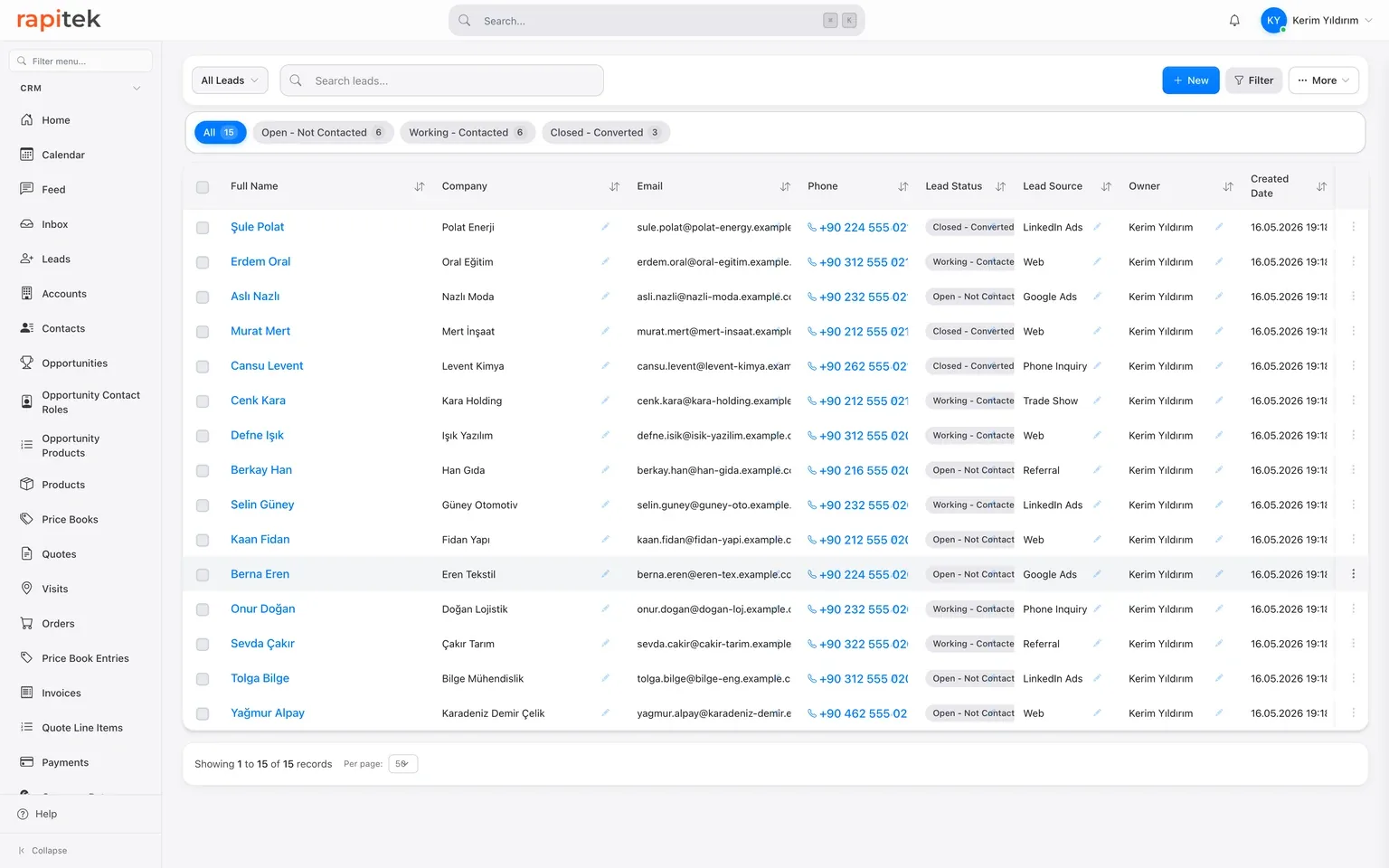
When customer tracking is kept in several separate places, it becomes unclear which information is current
Customer tracking already happens somewhere in every company: an Excel file, notes on a phone, the salesperson's memory and WhatsApp conversations. The wound is that these pieces do not see one another.
Here is the picture we have seen again and again in our own CRM projects:
- Every salesperson has their own list; there is no answer to the question "which list is the current one". Two people can call the same customer separately.
- There is no such thing as a follow-up date field. The "call next week" note sits in someone's head or on a sticky note; remembering is left to the individual.
- The quote is prepared in Word, goes out by email and disappears there. "How many quotes did we send last month, how many were accepted" can only be answered by counting by hand.
- Conversations stay on personal phones. When a salesperson leaves, the customer history leaves with them.
- At the end of the month the manager collects files from everyone and merges the figures by hand.
None of this is solved by a better Excel template. It requires a shared record, reminders and permissions, and that is exactly the job of customer tracking software.
Tuesday, 09:15, a new enquiry has just arrived from your website.
-
1
The enquiry becomes a record, together with its source
An enquiry arriving from a form, a phone call or WhatsApp is opened as a lead; its source (web, advertising, referral) is captured as a field. At the end of the month, which channel actually brought in customers is a report, not a guess.
-
2
The first call note and the next step on the same screen
The call note is written on the record and the next step is defined as a dated task. When the day comes it appears in the task owner's list; it is not entrusted to anyone's memory.
-
3
The opportunity enters the sales pipeline
As the conversation progresses the record becomes an opportunity: amount, expected close date and stage are clear. The manager sees the whole pipeline on a Kanban board: who is chasing what, and where each deal is waiting.
-
4
The quote is generated from the price list
Line items are picked from the product catalogue, a discount is applied, a PDF is produced and sent. The version and status of the quote stay on the record; no hunting for a Word file among attachments.
-
5
Quote follow-up is secured with a task
A task saying "ask about the quote in two days" is defined. If a revision is requested, a new version is opened on the same record; an accepted quote becomes an order.
-
6
The close is recorded with its reason
If it was won, why it was won; if it was lost, to whom and why it was lost, is captured as a field. Three months later, the question "was it price, product or speed" is answered with data.
The building blocks for customer, sales and quote tracking
Customer record and interaction history
Company, contact, phone, email and any custom fields you need on a single record. Calls, notes, meetings, emails and WhatsApp conversations accumulate beneath the record with a time stamp; the answer to "what did we last talk about" is on the screen.
Sales pipeline and Kanban
Opportunities move stage by stage: amount, expected close, owner. The stages are configured around your process. We do the setup. The pipeline can be viewed as a list, a summary or a Kanban board.
Tasks and reminders
A dated task is attached to every record: call, ask about the quote, send the sample. When the day comes it is in front of the task owner. Follow-up moves from people's memory into the system's calendar.
Quote generation and tracking
Line selection from the product catalogue and price list, discounts, PDF output and status tracking. An accepted quote becomes an order. Multiple currencies are converted daily using TCMB exchange rates.
WhatsApp shared inbox
The team messages from the company's single business number; messages land in the team inbox and are written onto the customer record. The connection route we recommend is Meta's official WhatsApp Cloud API; QR pairing is not the official API and carries the risk of the number being restricted by Meta. We choose the method together during setup.
Reports and dashboards
Conversion by source, waiting time in a stage, quotes and closes per salesperson. Table and summary reports come ready; matrix and joined report types are supported as well. A drag-and-drop dashboard designer, without writing code.
Mobile in the field, and the connection to your existing software
Follow-up from the phone
Customer tracking does not end at the desk. Both our iOS and Android apps are live and they ship with a Turkish interface; as you leave a visit, the note, the task and the opportunity update are made from the phone, and visit check-in with GPS is supported. Rapi, the voice assistant in the app, creates and updates records in the CRM by speaking Turkish. WhatsApp and Instagram messages are managed in the single inbox inside the app. We gather the details on the mobile app page.
Email, calendar and other systems
You can connect your own Gmail account and send from inside the CRM; the email that goes out is linked to the relevant record. The connection covers sending and calendar sync: inbox reading is switched off, so this is not two-way inbox sync. Calendar sync is two-way and today works with Google Calendar; Outlook and Microsoft 365 connections are not live.
There is no out-of-the-box module for your ERP and accounting software. It would not be right to say there is. Because access differs from one installation to the next, a single button that works the same way in every installation cannot be built. The connection is established as follows: through the REST API, webhooks and import/export, by the team that builds and develops the product. Which data will flow in which direction is clarified on the integrations page and in the discovery call.
Where does customer tracking break down today?
| Topic | How it works today | After setup |
|---|---|---|
| Follow-up reminder | None, in your head or on a sticky note | A dated task; when the day comes, in its owner's list |
| Working at the same time | Version clashes, "list_current_v3_FINAL" | One shared record, simultaneous access |
| Conversation history | Cell comments and memory | Calls, notes, emails and WhatsApp on the record, time-stamped |
| Quote | A document template, manual version tracking | A PDF from the price list; status and version on the record |
| Mobile access | Scrolling a spreadsheet on your phone | iOS and Android apps live, with a Turkish interface |
| Permissions and handover | Wherever the file went; it leaves with the departing employee | Role-based permissions; records stay with the company |
| Reporting | A manual pivot at the end of the month | Ready report types and live dashboards |
| Data security | Copies circulating by email | TLS in transit, two-step verification, a separate database per customer |
Measured data, not a marketing sentence
How does the move from Excel to CRM work?
-
1
Discovery and analysis
We map out your existing Excel files, your sales flow and your team roles together. This is where it is decided which fields are genuinely needed: not every column that has piled up in Excel, only the ones that do a job.
-
2
Configuration
Fields, sales pipeline stages, the quote template, list views, the permission matrix and reports are set up around your process. No code is required; setting it up well takes expertise, and that part we do.
-
3
Data migration
The customer, contact and product records in your Excel files are imported; duplicate records are weeded out and columns are mapped to CRM fields. Your old data is in the system from day one.
-
4
Training and go-live
Training for the team and the manager, close support in the first week, then ongoing support. We do not commit to a duration before discovery; after the discovery call we give you a date, not a range. The scope of the setup and its cost, if any, is shared in writing before work begins.
From our CRM implementation projects: teams that moved scattered data into one system
At Anatolia Tile we have attached great importance to digital transformation in order to maintain our leading position in the global market since 1995. The CRM project we started with Rapitek completely transformed our sales processes. By bringing our customer data together on a single platform we increased our team's efficiency and accelerated our decision-making. Rapitek's sector experience and solution-oriented approach delivered results beyond our expectations.
 General Manager · Anatolia Tile

With Rapitek's solution-oriented approach, we began the work needed to quickly complete the improvements to the Salesforce customisations and integrations we were using. With the improvements made, duplication of data was prevented and we increased the efficiency of the system.
 Sales Director · Petroyağ

Our foundation needed a cloud-based software system for data management. Rapitek is a company that is careful and attentive in understanding our wishes and needs; it also transferred our requests into the system well. When we have new requirements, they support us with extremely fast and thorough solutions. As SEV, we are very pleased to be working with Rapitek.
 Project and Resource Development Manager · SEV Foundation

The references above belong to CRM implementation and integration projects carried out by Rapitek; they do not mean that those organisations use the Rapitek CRM product today. Brand names, logos and titles belong to their owners.
Data location, KVKK and security, as they are
A customer list is one of a company's most sensitive assets; where and how it is kept should be clear.
- Your data is held in the European Union. The database is in Helsinki (Finland), media files in Frankfurt, and backups in Falkenstein (Germany). We do not say that the data is held in Türkiye, because it is not.
- This means a transfer abroad under Article 9 of the KVKK. For this reason a disclosure notice is presented on our forms; the legal basis for your transfer is established together during the contract process. If you switch on the AI features, that request goes to the United States, a second transfer, which your disclosure notice has to cover separately.
- TLS is used in transit. Passwords are hashed one-way; two-step verification secrets and the credentials for email, WhatsApp Business API, Instagram/Meta, payment and İYS connections are encrypted at the application level. A separate database is used for each customer's CRM records, not a row filter in a shared table. Technical error logs sit outside that scope; they are kept centrally, and each customer sees only its own entries.
- There is role-based authorisation; who sees which record is defined during setup. You can export your data and take it with you whenever you wish.
We do not hold an information security certificate and we do not claim to. Every technical detail we state has its counterpart in the system; we answer your security questions in writing before setup.
We put the figure on the pricing page, not on this one
The scope of setup, data migration and training is not the same in every project; it is shared in writing after discovery. Plan prices we keep in one place, so that you never read a different figure in two places.
Three plans, a scope table and separately priced items on a single page.
Frequently asked questions about customer tracking software
What is customer tracking software?
Why does customer tracking in Excel stop being enough past a certain point?
Can we migrate our customer list from Excel?
What is the difference between sales tracking software and customer tracking software?
How does quote tracking work?
How much does customer tracking software cost?
Is there a free customer tracking programme?
Can we track WhatsApp conversations?
Is there a mobile app?
How long does setup take and what does it include?
Where is our data held?
What size of team is it suitable for?
See your customer tracking live, with your own scenario
In a 30-minute intro call, let us show you the customer record, the sales pipeline and the quote flow according to your process, with sample data from your own Excel file if you like. Then we open your 7-day trial account; no credit card required.
