Skip to content
WhatsApp + CRM

WhatsApp CRM: one number, history stays

Every incoming message lands in a shared inbox and is written onto the customer record. Even if a rep changes, goes on leave or leaves the company, the message history stays with you. This page is about how the inbox works across a team; how the line itself is connected on Meta's side is on the WhatsApp integration page.
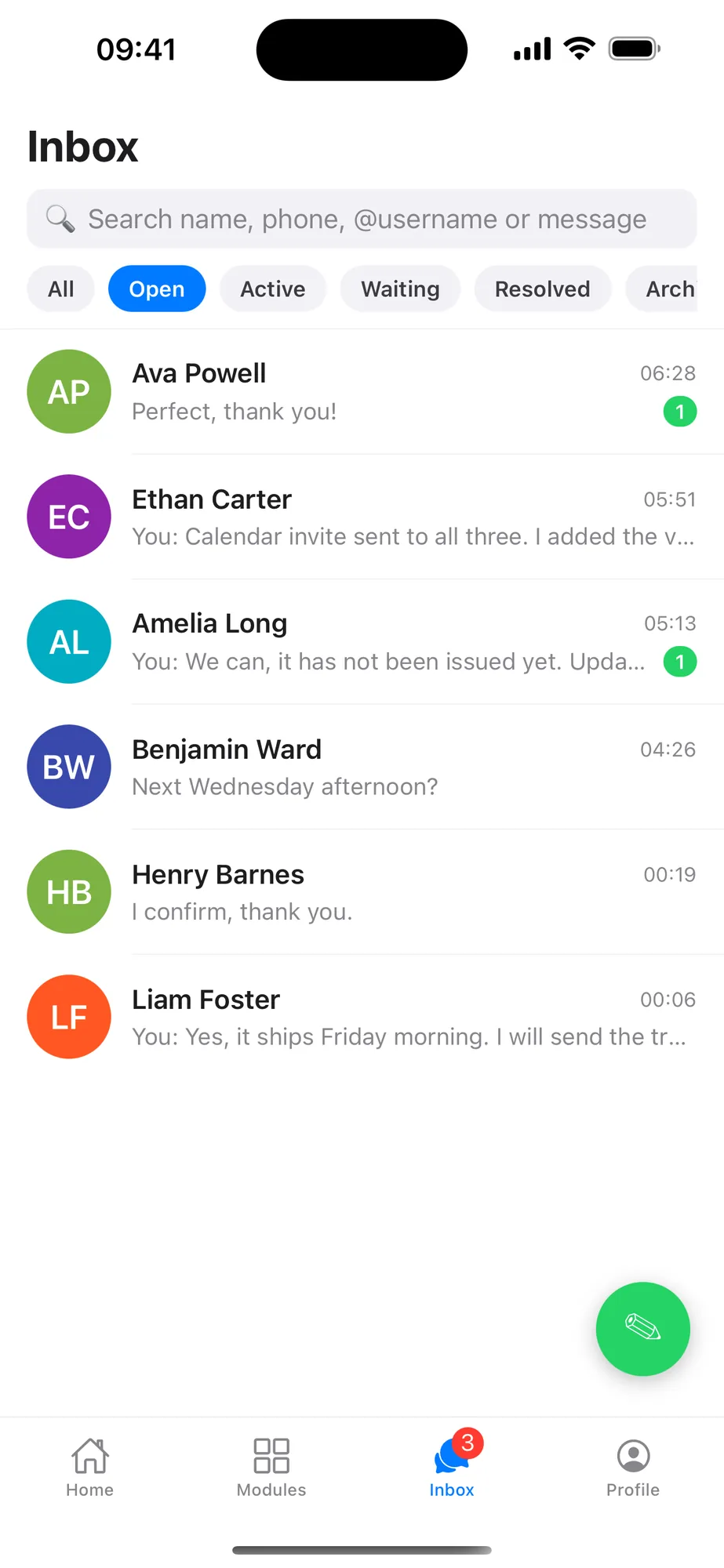
Rapitek CRM mobile app inbox: conversations listed by customer name with All, Open, Active, Waiting and Resolved status filters and unread counts
Shared inbox — mobile app

When WhatsApp conversations stay on personal phones, customer history never accumulates in the company

If your business correspondence has moved to WhatsApp, we do not need to tell you that; the customer is waiting for the green bubble, not for an email. That is not the problem. The problem is that the conversation runs on employees' personal phones.

This is the picture we saw again and again in our own CRM projects:

  • Every rep writes from their own number; the customer becomes the rep's customer rather than the company's.
  • When the rep goes on leave the conversation stops — nobody else can see it or take it over.
  • Prices, deadlines and promises given on WhatsApp are recorded nowhere; in a dispute there is no document in hand.
  • A manager can only find out what was discussed with which customer by asking.
  • When an employee leaves, their number, their contacts and years of accumulated message history go with them.

None of this is solved by banning WhatsApp — your customer is there. The solution is to take the conversation off the personal phone and connect it to the company's system. That is exactly what WhatsApp CRM does.

A concrete scenario

Wednesday, 16:40 — a customer writes to your business number.

  1. 1

    The message lands in a shared inbox, not on a personal phone

    A message sent to the company's single WhatsApp business number appears in the team inbox on web and mobile. Whose desk it is on does not matter; whoever sees it first can take the conversation.

  2. 2

    The number is matched to the customer record

    If the sender is a registered customer, the conversation is written straight onto their record. If the number is unknown, a new lead record is opened with its source logged — no manual data entry.

  3. 3

    The conversation is assigned to a rep

    Everyone can see who is handling it; when needed it is handed to another rep with an internal note. The customer never notices the handover — they are always writing to the same number.

  4. 4

    The reply goes out from the same business number

    Photos, documents, location and voice messages are sent and received in the same window; all of it is kept on the customer record. The price and the deadline you quoted are now on file.

  5. 5

    The conversation is linked to the opportunity

    If it turns into a sale, the conversation is attached to the opportunity record; the quote, tasks and reminders all move on the same card. Where work that came in from WhatsApp stands is visible in the sales report.

  6. 6

    Even when a rep leaves, the history stays with the company

    The user account is closed and their open conversations are handed to another rep. The customer keeps writing to the same number; years of message history stay on the customer record.

Department routing

Customers reach the right department.

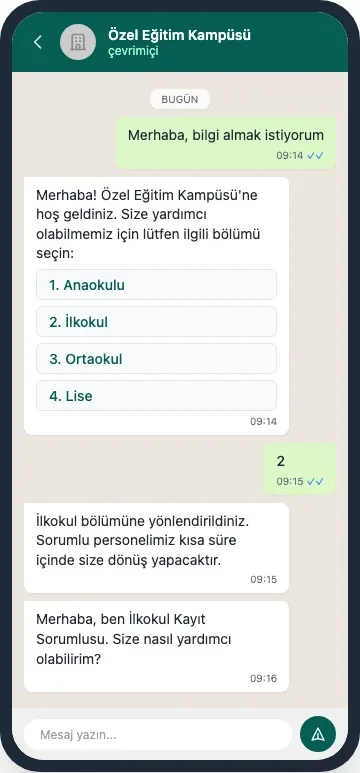
An incoming message is met by an automatic menu; the customer picks the relevant department and the conversation is routed to whoever owns it. The conversation runs on one business number and its history stays on the customer record — even when the rep changes.

A Rapitek CRM WhatsApp conversation (Turkish interface): the customer writes, an automatic department menu opens and after the choice the conversation is routed to the right owner
Department routing — one business number, automatic menu (Turkish interface)

The building blocks that connect WhatsApp to the CRM

One business number, one shared inbox

The whole team writes from the company's single WhatsApp business number; incoming messages land in the shared inbox on web and mobile. Conversations are assigned to a rep and handed over with internal notes. The customer never sees how many people are working behind it.

Written to the customer record automatically

Every message is written onto the customer record that matches the sender's number; for unknown numbers a new lead record is opened with its source logged. Text, images, documents, audio and location are kept together.

On the same screen as the pipeline

The conversation is linked to the related opportunity record; the quote, tasks and reminders move on the same card. Where work that came in from WhatsApp is waiting shows up in the sales reports.

Template messages and the approval flow

Texts such as an appointment reminder or an order notification are managed as templates from inside the CRM. Templates are submitted for Meta approval through your own WhatsApp Business account; the decision and how long it takes sit with Meta. The team only uses approved texts.

The İYS consent check runs before sending

Before a commercial electronic message is sent, the recipient's record in İYS — Turkey's national consent registry — is checked: opt-out records coming from that registry land on a local suppression list, and no commercial message goes to that recipient. Informational messages are not affected. Consents are managed two-way through an authorised integrator.

Permissions and audit

Who sees which conversation is set by role; a manager can see the team's correspondence. When an employee leaves, their access is closed and their conversations are handed over — the records stay with the company.

The connection is built with the official Cloud API — the detail is on a separate page

This page describes the inbox; how the line is connected is a separate subject and we wrote it up end to end on the WhatsApp integration page. Briefly, even so:

The route we recommend and build is Meta's official WhatsApp Business Cloud API. We connect your own Meta WhatsApp Business account; the app, the WhatsApp Business account and the number stay in your name, and Meta invoices you directly. We do not sell message bundles or credits in between.

On Meta's side there are business verification, number registration and template approval steps; we run that process as part of the implementation. We give no commitment for Meta's decision time — the approval decision, and how long it takes, sit with Meta, not with us.

We do not offer pairing a phone by QR code as a product promise. The same inbox can be connected that way too, but the method is not Meta's official API and it carries the risk of the number being restricted by Meta; if that risk materialises your business line goes down. If you still prefer that route we share the risk in writing and take the decision together.

The same inbox on the phone; connecting your other software

Replying from mobile

Our iOS and Android apps are live and come with a Turkish interface; the shared inbox works the same way on the phone. A rep in the field sees the message, replies, and updates the customer record and the follow-up task. Rapi, the voice assistant in the app, does not only read the CRM by speaking Turkish — it creates and updates records too. The call is yours: Rapi is off by default; unless you turn it on, your CRM data is never sent to any AI provider. Where the request goes once you enable the assistant is written on our security page.

This matters more than it sounds: if an inbox can in practice only be used on the desktop, telling a rep who is out in the field to “just log in on the web” means telling them not to use it.

ERP, accounting and your other systems

WhatsApp is not your only channel. If you use accounting software, an ERP or another business system, the connection is built like this: over the REST API, OAuth2, webhooks and import/export, by the team that builds and develops the product. For the general framework, see the integrations page.

Let us be reachable too: you can write your questions to our WhatsApp line — +90 212 963 22 84.

What we can say

What we have verified about the inbox

Core
The messaging inbox is in the product's core, not an add-on
Live
SLA engine in messaging: first-response target, business-hours calendar
iOS + Android
The shared inbox also opens in the mobile apps on the stores
Two-way
İYS commercial-message consents are managed via an authorised integrator
EU
Data location: database Helsinki, files Frankfurt, backups Falkenstein
Implementation

How is WhatsApp CRM brought live?

  1. 1

    Discovery and the number decision

    Which teams will write, whether an existing number is used or a new business number taken, which legal entity the verification runs through — we take these decisions together. The business verification and number registration on Meta's side we run as part of the implementation.

  2. 2

    Configuration

    The inbox, rep permissions, customer-record fields and template messages are set up around your process; templates are submitted for Meta approval through your own WhatsApp Business account. No code is needed — but setting it up well takes expertise, and that part we do.

  3. 3

    Data migration

    Your customer list, from a spreadsheet or your current system, is imported; phone numbers are matched to customer records and duplicates are weeded out. From day one, conversations land on the right record.

  4. 4

    Training and go-live

    Rep and manager training, close follow-up in the first week. There is no call centre on our support line; the team that builds the product answers. We do not commit to a duration before discovery; after it we give you a date, not a range. Meta's approval timing depends on Meta.

From our CRM implementation projects

What the teams who moved into one system say

As Anatolia Tile, we place great importance on digital transformation to maintain our leadership position in the global market since 1995. The CRM project we initiated with Rapitek completely transformed our sales processes. By consolidating our customer data on a single platform, we increased team efficiency and accelerated our decision-making processes. Rapitek's industry experience and solution-oriented approach enabled us to achieve results beyond our expectations.
Şemun Alp Biber General Manager · Anatolia Tile
Read the customer story
With Rapitek's solution-oriented approach, we started the necessary work to quickly complete improvements in our Salesforce customizations and integrations. With these improvements, we prevented data duplication and increased system efficiency.
Ögetay Can Sales Director · Petroyağ
Read the customer story
As a former Salesforce user, getting to know Rapitek was an opportunity that opened the doors to different solutions for us. With the smart solutions their consultants provided, we significantly increased our efficiency. In addition, thanks to our collaboration with Rapitek, we seamlessly integrated our product with Salesforce and made our processes more efficient.
Utku Aydın Business Development Director · Iyzico

The references above relate to CRM implementation and integration projects carried out by Rapitek; they do not mean that those organizations use the Rapitek CRM product today. Brand names, logos and titles belong to their owners.

A WhatsApp conversation is personal data — data location and KVKK, as they are

WhatsApp conversations contain names, phone numbers, addresses, sometimes prices and contract detail; that makes them personal data, and they should be managed as such. So we are plain here.

  • Your data is kept in the European Union. The database is in Helsinki, uploaded files and media in Frankfurt, database backups in Falkenstein. We have no component in Turkey and we do not offer region selection; we do not say the data is kept in Turkey, because it is not.
  • Seen from Turkey this is an international transfer under Article 9 of KVKK. The message itself also passes through Meta's infrastructure; that is true of every enterprise WhatsApp deployment. We establish the basis for the transfer together during the contract process.
  • TLS is used in transit; credentials and two-factor authentication secrets are protected at rest. Your CRM data is kept in a separate database that belongs to you.
  • For marketing messages there is İYS-compliant commercial-message consent management; campaigns are only sent to consented lists.
  • Who sees which conversation is set by role-based permissions; when an employee leaves their access is closed and the records stay with the company.

We do not hold an information security certificate such as ISO 27001 or SOC 2, and we do not claim to. Every technical detail we state has a counterpart in the system; we answer your security questions in writing before implementation. For detail, see our security and KVKK privacy notice pages.

We put the figure on the pricing page, not on this one

The implementation scope of the WhatsApp line is worked out in the discovery call and shared in writing. Plan prices we keep in one place — so you never read two different figures for the same thing.

Three plans, a scope table and separately priced items on one page.

FAQ

Frequently asked questions about WhatsApp CRM

What is WhatsApp CRM?
WhatsApp CRM means connecting WhatsApp conversations to customer relationship management software: the team writes from one business number, every message is written onto the relevant customer record, and sales and support run on that same record. In Rapitek CRM the connection is built over Meta's official WhatsApp Business Cloud API; we connect your own Meta WhatsApp Business account. The step-by-step account of the connection is on our WhatsApp integration page.
Why do we need WhatsApp CRM when we already have the WhatsApp Business app?
The WhatsApp Business app is designed for one person: it is limited to a few linked devices, the conversations stay on the phone, and they are not related to a customer record. In WhatsApp CRM the whole team writes from the same number, conversations are assigned to reps, the history is kept on the customer record, and a manager sees the team's message traffic in reports.
Can several reps use the same WhatsApp number?
Yes — that is exactly what this page is about. Incoming messages land in the shared inbox on web and mobile; conversations are assigned to reps and handed over with internal notes. The customer always deals with a single company number and never sees how many people are working behind it.
What happens to WhatsApp conversations when an employee leaves?
Because the conversations sit in the company's CRM rather than on the rep's phone, they stay with the company. The user account is closed, their open conversations are handed to another rep, and the customer keeps writing to the same number. In a setup that runs on personal numbers there is no equivalent to this; that is the concrete return of a shared inbox.
Can we use our existing WhatsApp number?
Yes, with one condition. If the number is currently used in personal WhatsApp or in the WhatsApp Business app, it has to be removed from there before it can be registered on the Cloud API; it does not work in two places at once. Old conversations on the phone are not carried into the CRM; the history starts accumulating from the day of connection. Taking a new business number is also possible — the decision is made together in the discovery call.
Is it possible to connect by pairing the phone with a QR code?
Technically possible, but we do not offer it as a product promise. The method is not Meta's official API and it carries the risk of the number being restricted by Meta; if that happens your business line goes down. The route we recommend and build is the official Meta Cloud API. If you still prefer that route, we share the risk in writing and take the decision together.
Can we send bulk messages or campaigns from WhatsApp?
Sending is done only with Meta-approved templates and only to lists that hold commercial-message consent; consents are managed two-way through the İYS connection. How many messages you can send is set by the ceiling Meta grants your account; because that ceiling does not come back to us as a readable value from the API, we do not put a figure on this page. You see your current limit in your Meta Business account. Meta invoices the conversation cost directly to you; we work that cost out with you when planning a campaign.
How long does the WhatsApp CRM integration take to set up?
We do not commit to a duration before discovery; after the discovery call we give you a date, not a range. The WhatsApp connection is built inside that schedule. The timing of business verification and template approvals on Meta's side depends on Meta; we run the process, but we give no commitment for Meta's decision time. The scope of the implementation, and any fee for it, are worked out at discovery and shared in writing.
What does the WhatsApp integration cost?
We apply no separate module fee on the Rapitek side for the WhatsApp connection; current plan information and the items priced outside the plan price are listed one by one on our pricing page. On Meta's side the conversation cost is invoiced directly to you: we do not sell message bundles or credits, and we add nothing on top of that cost. We work the total cost out in writing in the discovery call.
How are WhatsApp conversations kept under KVKK?
The database is in Helsinki, uploaded files and media in Frankfurt, database backups in Falkenstein; we have no component in Turkey. Seen from Turkey this means an international transfer under Article 9 of KVKK; the message itself also passes through Meta's infrastructure, and we establish the basis for the transfer together during the contract process. TLS is used in transit and your CRM data is kept in a separate database that belongs to you. For marketing messages, İYS-compliant commercial-message consent management comes into play.
Can we see the product before buying?
There is no trial you start on your own. We begin with a 30-minute live demo; afterwards, if you want to explore at your own pace, we open a time-limited demo account. In the demo we show the product live on your own scenario and answer your questions in the same call. The WhatsApp connection and the configuration specific to your process are done after purchase, during implementation.
Can we reply from the phone?
Yes. Our iOS and Android apps are live and come with a Turkish interface; the shared inbox works on the phone too, so a rep in the field sees the message and replies. Instagram direct messages are not available today. Rapi, the voice assistant in the app, creates and updates records in the CRM by speaking Turkish.

Connect your WhatsApp traffic to the company's memory

In a 30-minute demo let us show the shared inbox, the automatic writing to the customer record and the template message flow — on your own scenario.

The implementation scope, and any fee for it, are worked out at discovery and shared in writing.

Made with RapitekGO

We would like to use optional cookies to measure your visit. The site works exactly the same if you decline. Cookie policy