
Everything you need in a CRM.
Sales, marketing, customer service, and operations on the same data model. We built the product around the needs we ran into on the enterprise CRM projects we delivered during our Salesforce years.
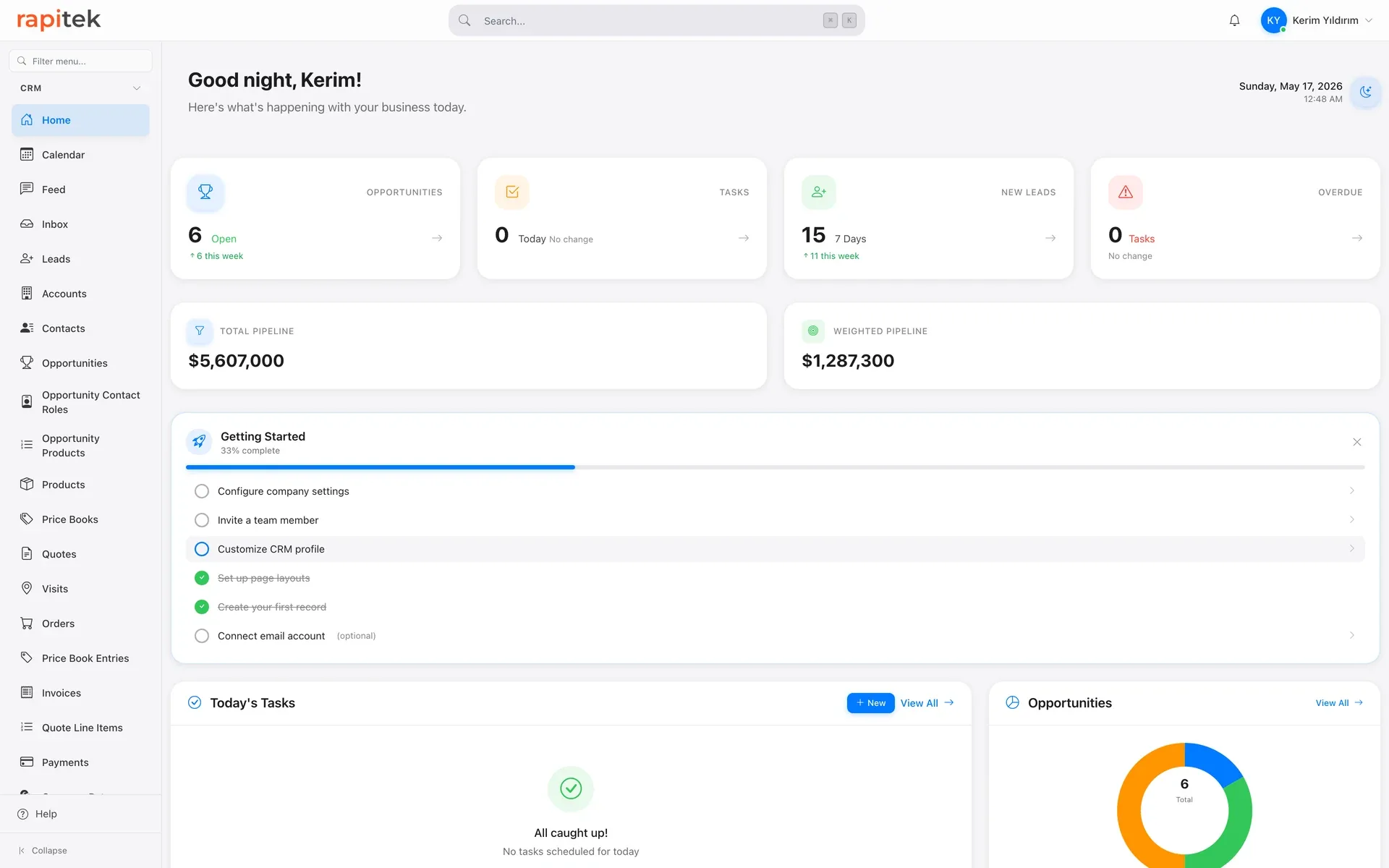
Four hubs, one platform.
Sales Hub
Sales pipeline and Kanban, lead, opportunity, and activity management, quote generation, including price lists, discounts, PDF output, and conversion to orders; quote-to-order conversion runs through the product's own conversion action. Case management runs in this hub as well.
Marketing Hub
Campaign management, WhatsApp campaigns, and commercial-message consent management. If you connect your own İYS account (Turkey's national consent registry) via Verimor, SMS and e-mail consents and opt-outs go to İYS, and those made in İYS come back to the CRM; WhatsApp is outside this sync. The Meta Lead Ads connection cannot be set up today; there is no out-of-the-box ad-form module.
Communications and WhatsApp CRM
WhatsApp, email, and SMS conversations land in a single shared inbox; campaigns and message templates are managed here. Instagram direct messages land in the same inbox; campaigns and templates do not cover Instagram.
Operations Hub
Bill of materials, multi-level cost roll-up, production line and work order screens are in the product; the production and warehouse side is an optional add-on module. Work order execution is new; if your process depends on it, let's try it together in the demo.
AI assistant
In the mobile app, Rapi creates and updates CRM records by speaking Turkish; the business-card scanner also runs in the mobile app. It can be set to ask for confirmation before saving risky changes. The call is yours: AI features send content to Anthropic only when you use them or enable them in an automation; an administrator can turn them all off with one switch. Details on the Security page.
Platform controls
Two-factor authentication (email code or authenticator), a field-level audit trail, and a recycle bin. Role hierarchy and record sharing rules are supported; we define them together during setup.
The Monday after go-live: what changes in each hub
| Hub | What goes missing today | The Monday after go-live |
|---|---|---|
| Sales Hub | The rep leaves a visit meaning to write the note that evening; when it never gets written, nobody's screen shows where the opportunity stands. And whoever prepares the quote does not know the customer's overdue balance. | The note goes in from the car, spoken into the phone as soon as the meeting ends: Rapi writes the record and opens the follow-up task. When a quote is prepared, the customer's overdue balance sits on the same screen, once the ERP connection is in place; no call to accounting. |
| Marketing Hub | Bulk commercial messages go out from a list someone keeps by hand; if a number on it has opted out, that does not show up before the send. | If you have connected your own İYS account through Verimor, opt-outs the recipient makes directly in İYS are checked every 6 hours and can take up to a day to reach the CRM; once they arrive they land on a local suppression list, and no commercial message goes to that recipient. Informational messages are not affected by this restriction. |
| Communications | The customer writes to the rep's personal phone; when that person goes on leave the conversation stalls, and when they leave the company the message history goes with them. | The message lands on the company's single business number and the conversation is attached to the customer record. When the rep changes, the conversation is handed over with an internal note; the customer never notices the handover. They are always writing to the same number. |
| Operations Hub | The bill of materials sits in one spreadsheet and the cost calculation in another file; when a quote goes out, the two never meet. | The bill of materials and multi-level cost roll-up sit on the same data model as the customer and quote records; you do not open a separate file to look at cost. The production and warehouse side is an optional add-on module, scoped at discovery. |
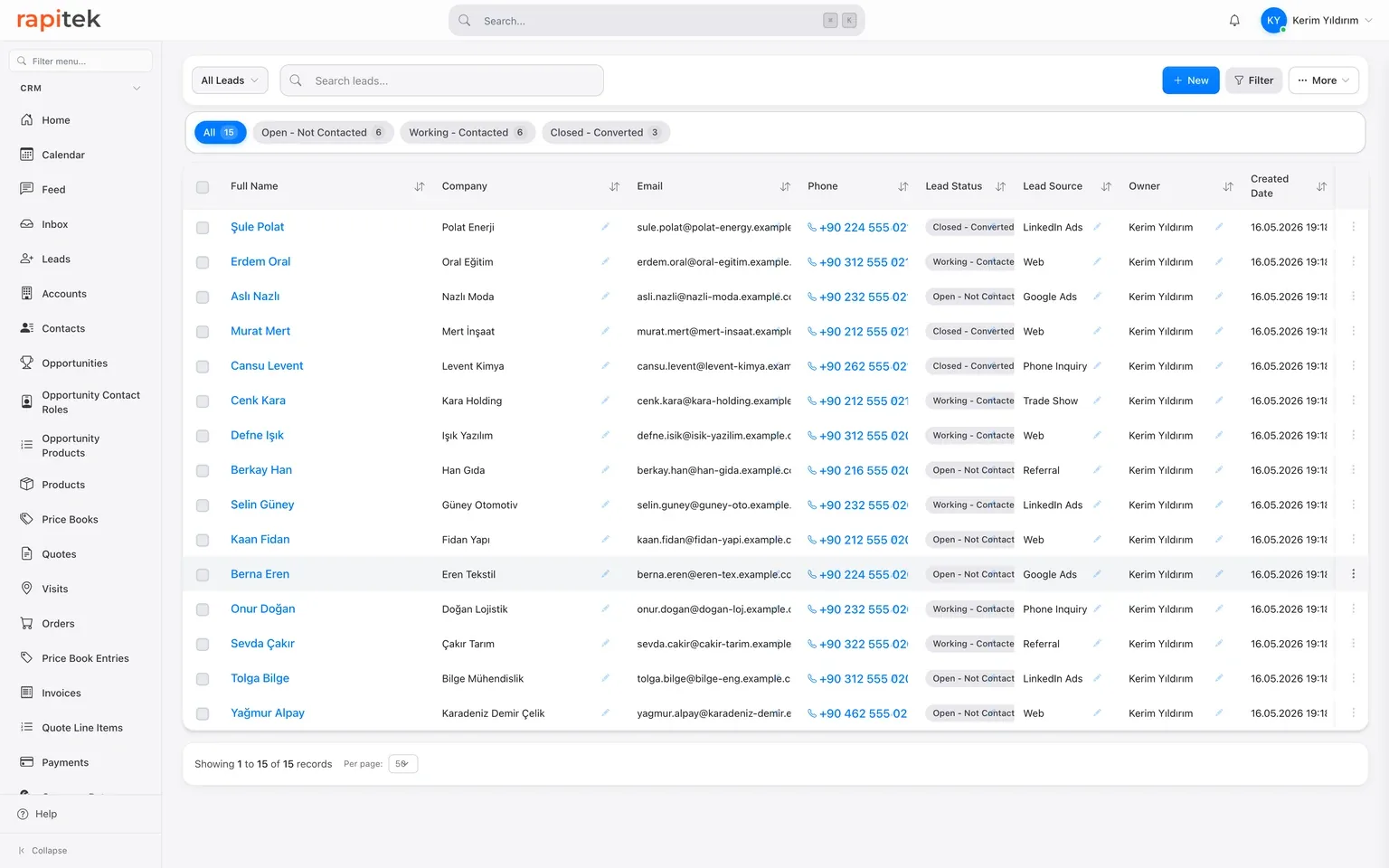
Every lead, on one screen.
Who's interested, what stage they're at, where they came from, who owns them, all in one list. Instead of chasing who's tracking what across a scattered team, you see the whole pipeline at a glance. The channel a record came from sits in the source field; channel-level reporting is produced from that field.
What is Rapitek CRM?
Rapitek CRM is a cloud-based customer relationship management (CRM) application built and operated in Istanbul by Rapitek Bilişim. Founded in 2018, Rapitek helps sales, marketing, and customer service teams manage leads, contacts, accounts, opportunities, quotes, invoices, and customer communication on a single platform. What it connects to is listed on our integrations page, and how it is set up per industry on our industries page. How a team handles WhatsApp and Instagram messages from one number is on the WhatsApp CRM page.
Each customer gets its own separate database: separation at the database level, not a row filter in a shared table. Your data is hosted in the European Union: the database in Helsinki, files in Frankfurt, backups in Falkenstein. A few sub-processors operate outside the EU; we name each one and say where it processes data in our privacy policy. Seen from Turkey, this counts as an international data transfer under Article 9 of KVKK, Turkey's data protection law (No. 6698); we establish the basis for that transfer together during the contract process. For the customer data you enter into your CRM, you are the data controller and Rapitek is the processor; the obligation to establish that basis sits with the controller, that is, with you. The technical measures are listed one by one on our security page.
Salesforce experience, independent consulting. Our team delivered enterprise implementation projects in the Salesforce ecosystem; that period has ended, and we hold no official partnership today. We provide independent consulting on performance tuning, data migration, integration, and security reviews. For official partnership benefits, you would need to talk to Salesforce directly. We wrote that history out in full on our about page.
Your data, under your control.
| Area | Rapitek CRM |
|---|---|
| Data separation | A separate database that belongs to your company. The application routes each request to your company's database based on the web address it arrives at |
| Data location | European Union: database in Helsinki (Finland), files in Frankfurt, backups in Falkenstein (Germany) |
| Customization | Fields, objects, flows, and page layouts are configurable without code; we do the setup |
| Setup and training | Scope and any fee agreed in writing at discovery |
| Support | From the team that builds and runs the product. We do not commit to a written response time (SLA) |
| Data ownership | Export your data and take it with you; we charge nothing for the export when you leave |
What it connects to
| Area | Scope |
|---|---|
| You connect your own Gmail account over OAuth; the connection covers sending email and calendar sync, not two-way inbox sync: inbox reading is switched off. Outlook and Microsoft 365 connections are not live. Generic IMAP/SMTP is not supported | |
| Calendar | Two-way appointment and event sync with Google Calendar; calendar sync is Google-only. Outlook and Microsoft 365 connections are not live |
| Messaging | Two-way shared inbox via the WhatsApp Business Cloud API; you connect your own WhatsApp Business account |
| Ad forms | The Meta Lead Ads connection cannot be set up today. There is no out-of-the-box ad-form module; leads from forms you host yourself can be posted to the CRM with their source tagged, over REST API or a webhook |
| ERP and accounting | Connected per project by the team that builds and runs the product, over REST API, webhooks and import/export |
| API | REST API for reading and writing every CRM record; standard authorisation (OAuth2), a request limit to prevent overload, and usage analytics |
| Mobile | iOS and Android apps are both live, in Turkish and English; push notifications are sent. GPS visit check-in is supported; we define it together during setup. WhatsApp and Instagram conversations are handled in the single in-app shared inbox |
| Currency | Multi-currency; automatic daily conversion using Turkish central bank (TCMB) rates |
What each plan covers, on one page
Three tiers, a scope table and separately priced items, with the numbers. We do not put prices on this page, so you never read two different figures for the same thing.
Scope and any setup fee come out of the discovery call.
Product questions, answered.
Can we customize the system ourselves?
Which modules does Rapitek CRM include?
Does it integrate with our existing ERP?
How do email and calendar connect?
Can I manage multiple business units in one CRM?
What exactly does the AI do?
Is there a mobile app?
Is there multi-currency support?
Who provides support?
See all of it with your own data.
You can try it free for 7 days; we start with a 30-minute intro call. We prepare the call around your own use cases. No credit card required.
